Showing posts with label product. Show all posts

API Conf 2018 - Product Management for Engineers

Last week I attended and spoke at the 2018 API Conference in Berlin.

Having written about the topic before, my talk was titled: Your API as a Product - Thinking like a Product Manager (really aimed at engineers/architects/technologists).

It was recorded, so hopefully I will be able to share the video in the future, but the thrust of the talk was based around the concept that we are all building products on some level, and even if we don't have direct input into a commercial product that we might be writing code for, we have some output: code, bug reports, designs etc. So it makes sense, if we are all building products, and those products will all have users and therefore a user experience (your code, bug reports, design docs etc will be used by others, or maybe you yourself will be the user), that we try and learn from the discipline of Product Management, as it is focussed on building better products and better user experiences for the end users.

Slides are below, and really your best bet is to scroll down to the references section at the end and start watching the real Product Managers' talks.


Building a RESTful API like a Product Manager

Something I have been thinking about for a while is the idea of APIs as your Product - the idea that you should design, build and test your API like it's a public facing product (as it might actually be if its a public API), and what lessons we should be learning from Product Managers about how we achieve this.

In the latest instalment of their "Technology Radar", ThoughtWorks recommended the concept "API as a Product" as ready to trial (although I think it's far beyond trial stage - I can see no real risk of adopting the lessons from Product Management for your API).


I have generally been interested in Product Management for several years - I think it's hard not to get interested in the science of Product Management when you are building side projects, as you naturally have to think about the product you are building - sure, with side projects they can easily turn into vanity projects, where you just build what you think is cool, but I think it's still fun to think about real users and good Product Management techniques that can be applied even to side-projects.

Having tried to gain some understanding, I have turned to some classic material on the subject of Product Management: The Lean StartupDon't Make Me ThinkHow to Build a Billion Dollar App. I have also been lucky enough to attend Mind The Product Conference twice (though volunteering - but managed to watch lots of the talks), and to have worked with several great Product Managers.

So what lessons can we start applying? I think, if one statement sums it up, its an idea from Kathy Sierra:

Does your product make your users awesome?
This is a great way to think about APIs (I'm mostly talking about REST/GraphQL type APIs here - but this thinking is a great way of approaching design for normal class/interface/library APIs too).

As engineers, I'm sure we have all used APIs that don't achieve this - APIs that make us have to think, that make us feel stupid, that seem overly complicated (for example, the old Java Date library - the number of times I had to google just to find out how to simply create a specific date for something simple like a unit test is ridiculous). And hopefully, we have all used APIs that make us feel awesome - APIs that make us productive, that let us do what we expect to be able to do, and can (with the help of the IDE's auto-complete) let us guess what the method calls are.

Another idea Kathy Sierra mentions in that talk, and is also made famous from the title of the Product Management classic, is:

Don't make me think

I have written before about the StackOverflow and GitHub APIs, but they deserve a mention again, if you have ever written an integration with them, you will know.  The APIs are designed in such a way that sensibly models the domain model.

For example, take StackOverflow, if we were going to describe their domain model, what first class objects would we have? I guess Questions, Answers, Comments etc - and sure enough, their API models these:

/questions - will get you all the questions on the site

/answers - will get you all the answers,

Now, how do you think you might get all answers for a given question? Well, a list of answers should probably be a child of a question, so something that represents that, something like:

/questions/{Question ID}/answers

Sure enough, thats the URL - and the behaviour is consistent through the design, I'm sure you can guess how you might retrieve all comments for a given answer.

I'll be honest, developing against an API where I can guess the endpoints makes me feel pretty awesome.

MVP and the Lean Product

The idea of a Minimum Viable Product is a core concept in Lean Startup - the idea that you build the minimum version of the product that can get you feedback as to whether you are heading in the right direction before investing more effort in building out a fuller fledged product.

Whilst I think an appreciation of an MVP is a good awareness for any engineer - I have generally found it is useful in facilitating conversation when building a new product - if as an engineer you recognise some new feature is going to be considerable effort, its helpful to think about what hypothesis the feature is trying to test, and is there a simpler engineering solution to test the hypothesis.

However, the principal of not over engineering the API is also a good one - once you have a well designed domain model, its quite tempting to get carried away with REST design best practices and start building endpoints for all different variations of the model - however, unless you need them, it's better to start with less (if you are building a public REST API from the start then it might be harder to know what isn't needed, but you can still certainly build an MVP version of the API to test the hypothesis - e.g. whether people actually want to use your API)

User Testing

Another important part of building a product is collecting user feedback - Whilst a REST API may not be well suited to A/B testing (your consumers won't be very happy if switch the API design on them after they have implemented against a specific variation!), listening to user feedback is still important - because the consumers will likely be engineers (writing the client code), then hopefully they will be expecting REST standards and good API design principles, but another way to think about this is the importance of not making breaking changes to your API.

A technical way of thinking about this is Consumer Driven Contracts Testing - As RESTful APIs are de-coupled from the client code, the API doesn't have any idea what clients are using or doing, so this approach allows consumers to define what they expect from the API, and then the API can always test against these contracts, so be sure that any change to the API is still in keeping with existing consumers, or users, of the API.

Conclusion

I think, in general, all engineers can benefit from thinking about how good products are built, what concepts are important, and be able to think about the products or services they are building in this way - both in terms of thinking about the actual implementation as a product that someone else will be the user of (either externally if a RESTful API, but also internally if its cross-team or even just someone coming to take over your code once you have moved on).

Flat Design (& Android)

"Flat" is currently a big design trend, with pretty much all the big players getting involved.  One of the earliest big-hitters in the field was an iOS app called LetterPress (incidentally, the designer behind this has recently been working on Facebook's "Paper" app - which is also a pretty nice experience)

http://www.atebits.com/letterpress/

The trend found a surprising champion in Microsoft with their Windows Metro look (Windows 8, Windows mobile, xbox), before Apple(iOS 7) later joined the party as Jonny Ives took responsibility for software design as well as hardware. Now many of the most popular sites are sporting a flat look (Google flattened its logo, twitter went flat, even NerdAbility.com is sporting a flat design).

Flat design is about being more minimalist and user-focused - it skips the fanfare of effects or lifelike details for apps/backgrounds/controls and favours simple, clean, crisp minimal interfaces. It's kind of the opposite to the skeumorphic approach - which is using lifelike textures/look&feels for things (the obvious examples being on iOS pre-7 where the contacts have graphics in the background that make it look like a leather address book, or the notes app that has a lined paper background etc).  It avoids fancy 3-d fonts and elements, avoids shading, shadowing, textures - and just uses simple colours, fonts, shapes to quickly convey meaning (see letterpress image above - no fancy rounded corners, fonts or textures - just simple block colours).


Flat Android Design

There is no reason why you can't design an Android app following flat trend, in fact lots already have - Thankfully, as a core part of the flat trend is simple, it is simple to build flat looking apps in no time at all.

Fonts

There isn't any hard and fast rule on fonts really - obviously it should be simple, clean and understandable - for this reason, clean, light san serif fonts have been a common font style to use. The most famous, as used by Microsoft, is Open-Sans - this is the font used across their Windows8 OS. It's popularity also boosted by the fact that it is freely available on Google Fonts, so has swept the web in a fairly big way.


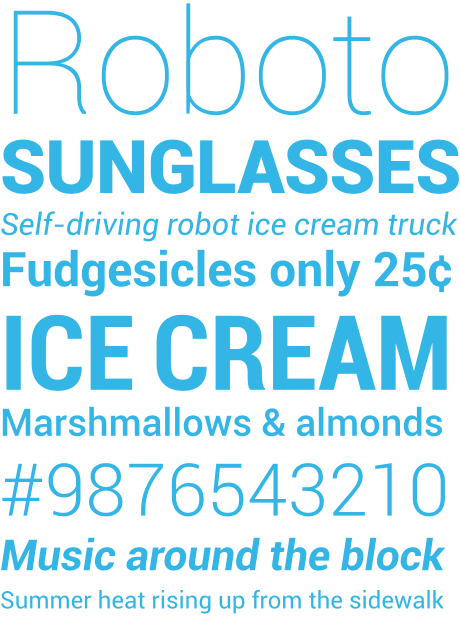
Thankfully, as it happens, Android (since 3.0) has come with packaged with a lovely san-serif font called Roboto. The range of weights, especially the thin and bolder weights allow you to achieve similar aesthetics in line with common flat design, whilst presenting a professional, clean & simple typography.  The obvious disadvantage of using the font is as it's built into later Androids, it's fairly widely used.  Personally, I like to use it. I use the default Android font largely across my apps, and if I want to add a bit of character to a heading/title then I opt for the thinner version of the font.


Buttons

Buttons are an interesting one.  Whilst the flat trend is becoming more pervasive, there are still questions regarding buttons. Buttons have always been skeuomorphic by design - the shading and texture to show a raised/bevelled button (like a real life button that you might press) is classic skeumorphism, and whilst this is simple to switch to a 2-D, flat look&feel, there are still arguments as to whether you should do this - as the button look and feel communicates to the user that it is a button - it is so widely accepted a metaphor, people seem concerned that without the detail, people may not understand it is a button. How can they tell if something is a button or just a coloured block quote? (see this stackexchange question on the topic)

http://www.nngroup.com/articles/windows-8-disappointing-usability/

 Above is an example from Windows 8 controls - as pointed out on the StackExchange link, all of those icons are actually buttons, along with the "Change PC Settings" - That could be fairly confusing, and would be an example of how not to design flat buttons.

Personally, I like flat buttons - as long as you take care to design the page so that the buttons are clear, and the form/page obeys general good UI heirarchy - an example of a simple form I was creating for an app with simple flat buttons is below:


As you can see, designing forms/controls that obey standard UI heirarchy and normal metaphors then it is still incredibly simple and clear what are buttons are what aren't. (I know it doesn't look like a fancy form - there are other decorations elsewhere as well though!)


Colours

There are of course, no rules about colour - but there are trends. A simple google image search for flat colours will give you lots of palettes, and there are also lots of great free tools on the web for building palettes

http://mikehince.com/design/amazing-colour-resources-for-designers/


Adobe's Kuler being a great example (lets you build schemes as well as share them with the community and look at other schemes)


Login with Friends

Social logins seem to be quite a divisive topic. Every now and then an article will pop up, and regardless of which way the author leans, the comments always seem to be almost always opposing the argument.


I think, by and large, we all agree that the login model on the web is kinda broken, and is continuing to become more and more fragmented with every new site gaining traction and offering their authentication API as a service.


To put it in fairly broad strokes, I think the main points for either side are:

Pro
  •     Simplifies login for your users — by offering one less username/password combo to remember it reduces the barrier to entry/conversion for your potential lead
  •     Outsources security — There are a lot of very smart people at Google/Facebook/etc that are working hard on authentication and security. Outsourcing your authentication process to them is surely better than trying to roll your own?
  •     Viral promotional channels — Authenticating with the likes of Facebook/Twitter will also offer you the possibility of easy integration with their social-sharing API

Cons
  •     Outsources security — the flipside of this is you are dependent on the third party getting security right. LinkedIn have been one of the high-profile victims of user account details hacking. If you were authenticating with LinkedIn, then your user accounts have also been compromised
  •     Reliant on third parties — should you ever try to build something that is reliant on the eco-system/infrastructure of another organisation? Will they always be around? Will they always be popular?
  •     Brand association — Especially with the recent Prism/NSA fallout, do you want to be associated with all these brands? Do you know that your users still trust these brands?
  •     Viral promotional channels — Many users are wary of apps that connect to third parties, and fear that if they sign up with Facebook then the application may try to share things with out their approval


Personally, I don’t like them. I generally don’t use them, but have done on occasion (yes, I know, medium is linked to my Twitter account).


I don’t like them for two reasons:

As a user it frustrates the hell out of me when I go to a site and I have to try and remember which registration mechanism I used — it normally goes something like this: 


“Did I sign up with email? Let me try my usual password”
[Username or password incorrect]
“Hmmm, maybe I did and have just put the wrong password in, let me try another password..”
[Username or password incorrect]
“Hmm, still no joy, I know, I will try password reset — that should send me an email if I have a password setup”
[Wait for email.. no show]
“Ok, must have signed in with Twitter”
[Click sign in with Twitter.. “This Twitter account is not linked to an account, please enter account details to link now”]
[close the tab]
[Later, receive a password reset email, confirming password is now a randomly generated password]
[sob quietly to myself]
 
From a product point of view, I don’t like them because I think they are ugly. I think littering your site with a myriad of other companies logos and brands is something of an eyesore, and provides suitable noise and clutter to distract from the key conversion goals of a page. Really, the only time I will sign up using these mechanisms is when they are the only option and I am already suitably sold on the product that I know I want to sign up (Medium being a good example — I would have signed up using a traditional mechanism given the choice, but I was already sold on the product so put up with the fact that I had to sign-up with Twitter).


By and large, I agree with MailChimp CEO, Ben Chestnut, and I am glad that in this case the evidence ended up being in his favor. However, I do appreciate that in other times, there is probably evidence showing them more favorably, and at times, I’m sure they can be pivotal in increasing a product’s viral coefficient or lead-conversion, rate — and in those cases, you have to go with the data.


But if I’m building something, until I see the evidence, I’m most likely going to avoid them.