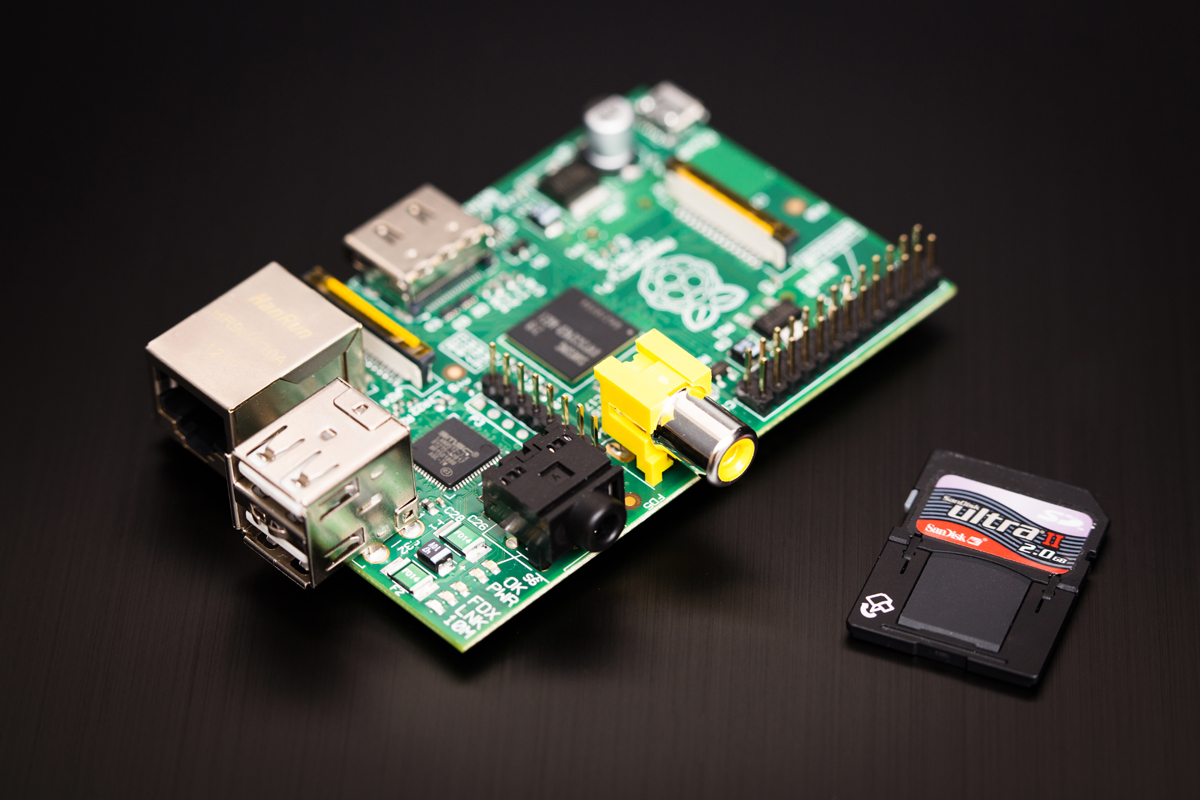
So, it was all plain sailing getting the Pi up and running with NOOBS following the instructions there, and quickly got it all setup with wifi connectivity and ssh access (which is essential for me, as I don't have a HDMI monitor other than my TV in the living room - so until I could get ssh access from my normal workstation it meant having to take over the living room to configure the Pi on the TV, which my wife was not best pleased about! Also a much cheaper option than buying a new HDMI monitor just for the Pi).
I had been looking around for how to get started with some hardware hacking with the Pi, and must admit the last time I did anything vaguely electronics was when I was in school at 14yrs old (actually I did a robotics module in uni, but that was still mostly programming stuff rather than actual chips/resistors/wires etc). Some of blogs were writing about how great/essential the Adafruit Pi Cobbler was, and again, I had to go and google and read up exactly what a breakout "cobbler" would be useful for etc but decided that enough people were going for it to invest
(So yeah, that's the Amazon affiliates link - it means I get some money from amazon if you buy this thing from here - it doesn't cost you anything, but is nice for me, so by all means click & buy!)
That lead me on to looking more extensivley at the adafruit site, which has some nice tutorials and all recommend using the Occidentalis OS if you are planning some hardware hacking.
Setting up Occidentalis OS
Occidentalis doesn't come in as nice a package as NOOBS - You basically need to get the image, flash it to an SD card, then boot up your Pi. I'm on Windows 7 setting up the SD card, so here are the steps/software I used:
- SD Formatter (from the SD association - this is one of the standard tools recommended in normal Pi setup tutorials and is a pretty convenient way to format SD cards) - https://www.sdcard.org/downloads/formatter_4/
- Fedora ARM installer - This can be used to install OS images on to an SD card - you can't just copy & paste downloaded images on to an SD card and this just makes it pretty easy - https://fedoraproject.org/wiki/Fedora_ARM_Installer
- Occidentalis distro image - This is Adafruit's mod of the Raspian Wheezy OS and is modified specifically with hardware hacking in mind - The latest version is currently at v0.2 - http://learn.adafruit.com/adafruit-raspberry-pi-educational-linux-distro/occidentalis-v0-dot-2
Getting the Occidentalis image and flashing it to an SD card is pretty straight forward if you have the above software - the steps are as follows:
- Format an SD card - it really needs to be 4gb - I am using an 8gb samsung card that is working fine (disclaimer: as with any formatting or writing images to drives - make sure you are targeting the correct drive for your appropriate SD card - as all data will be wiped!)
- Assuming you have downloaded the Occidentalis image from the above link, extract the zip file locally
- Right-click and select "Run as administrator" on the Fedora ARM installer executable. For the source option, select "Browse" and navigate to the .img file you have just extracted from the zip. For the destination triple-check that you have your SD card drive selected (again, this drive will be wiped and all data overwritten when you hit the install button). Then press install. This will correctly setup the SD card with the OS image.
- Jam your newly setup SD card in your Raspberry Pi and startup as usual. For most of the boiler plate setup, this will work just like Wheezy/NOOBS setup.
Uh.. Wait.. My Pi isn't Booting..
So yeah. This happened to me. I setup the SD card and jammed it into my Pi and nada. The red power light flickered on, but no signs of activity and no output on the HDMI. I did some research, and it turns out that there is a problem with some OS booting if they are using the Hyinx/Samsung RAM chip on the newer models of the Pi. However, my Pi used neither of those RAM chips, mine was fitted with the Micron RAM chip, but still suffered the same problem.
Thankfully with a little tinkering, the same solution generally seemed to resolve this problem for me. If you are experiencing this problem, here is what fixed it for me:
- Download and flash and standard OS distrubution to the SD card - I just grabbed the standard Wheezy distro from the Pi download site and flashed that to my SD card as per above instructions
- Once on the SD card, I backed up the files written (only ~35mb) locally
- I then installed the Occidentalis image to my SD card (the image that wasn't booting previously, again using the steps above)
- I then copied the bootloader files from Wheezy backup on to my SD card - this was just overwriting the bootcode.bin and start.elf files from my SD card with those I had backed up from the standard Wheezy distro.
- Jam the SD card in and power up..
So.. I'm off. I will now get the normal wifi stuff setup, plus set up the ssh keys for my github account so I can stick all my code on there (I'm not relying on some flaky SD card for my code backups), the next Pi post will likely be about the Cobbler and basic stuff connecting the Pi to a bread board and a few LEDs, maybe a motor or two.. but the first step for that is soldering my Adafruit Cobbler.
Yep. I'm gonna have to use my hands..
Is one of your New Year Resolutions to re-skill? Thinking about re-training for a new career (or even just a new hobby) in tech? Then you're in luck!
Today, more than ever, the barrier to entry for starting to learn a new technology or programming language is all but nonexistent, all you really need is a computer (or even a mobile device) and a web connection and you are pretty much good to go - just choose your preferred technology, an IDE and get started. Almost everything is open source or at least free to use for a single developer just out to learn and there is a wealth of blogs, articles and Q'n'A sites ready to help you with tutorials, walk-through's and helpful advice - many of these backed with ready and running code bases on GitHub free for you to play with and generally work out what is going on.
However, with all these resources it can sometimes be a bit daunting with so much content. Once you have chosen a language how do you know where to start? Here are some of our favourite sites and resources that we have discovered and found useful in learning new skills:
- iTunes U - a lesser known category on iTunes is their academic section, iTunes U(niversity) featuring loads of podcasts and lectures from a range of academic organisations, and some of this stuff is serious! Several large universities have uploaded full lecture series there, and by and large they are free to download (yes, you have to install iTunes, which sucks, we know). Want to take the full term of Stanford university's iOS course? Its up there. Want to learn AI for chess playing from Cambridge uni? Yep, got that too. And for free.
- MIT OpenWare - MIT have been one of the strongest advocates of open sourced education. A lot of there lecture series are online (can also be found on iTunes, but can be avoided). Is it just us who thinks its amazing that anyone around the world with a web connection can get educated by the most prestigious academic organisations around?
- Khan Academy - there is a lot of hype around this one, well funded with some pretty big names supporting it (jQuery creator John Resig is a Dean there), a not-for-profit aiming at providing free education for everyone. The academy provides lots of video based courses as well as interactive challenges and detailed stats on how you are doing.
- Udacity - this is another recent, well-funded startup trying to tackle free higher education for all. Founded my three robotocists it is slowly building a very respectable catalogue of uni level courses ranging from CS101 to AI for robotics. As with the Khan academy, the lectures are purely for the web so the videos are clear and designed for remote learning (different from the filmed university lectures which are targeting classroom based learning). We have recently created and Open Sourced the Spring-Social implementation of the Khan Academy API - so if you are working with the JVM and want to have a play with the Khan Academy API then check it out on GitHub
- CodeAcademy - we have mentioned before we are fans of code academy, code academy is an in-browser development environment that walks you through programming exercises to help you learn with your hands - currently supporting JavaScript, HTML, Ruby and Python
- Free eBooks - there are loads of great free eBooks available online, so many there is no point listing them, instead I will just point you here. Which leads nicely on to the next point..
- StackOverflow - what really needs to be said about SO? It is the definitive q'n'a site for tech. If you are just starting learning head over and sign up, the help from the incredibly active community over there will be invaluable (although be sure to read the posting guides, they can be a little unforgiving at times!).
- Coursera - Another massively popular online learning resource, this one recently generated a lot of interest with its recent Scala course taught by the original creator of the language! We are currently working on some secret integration with Coursera at NerdAbility, and you will soon be able to integrate your Coursera account and show off which courses you have completed!
Hopefully the above resources help on your path to re-skilling. In reality, getting your hands dirty with code and trying to solve problems and fix errors is the best way to learn, so don't forget to get stuck in - and maybe when you are more confident try answering questions on StackOverflow!
Of course, with these new found skills you will want to show them off, so we'd recommend heading to NerdAbility and registering (if you haven't as already) and update your skills, add your StackOverflow profile and even add a custom section talking about what you are learning (employers always love to know that candidates are proactive and motivated when it comes to learning new things and keeping up with technology).
Leave your comments with any other tools and resources you have found useful in your journey of becoming a life long learner.
.png)