Showing posts with label graphs. Show all posts

Graph data structures - Searching

Previously we looked at an introduction to graph data structures and designed a very basic Graph implementation.  I also mentioned that the main things we would likely want to do with a graph is search/explore the graph.


There are two primary tools that we will use to explore graphs - these are basic computer science concepts, and should be familiar to everyone who has studied computer science at uni and faced graphs before.


Depth First Search (DFS) 

The concept behinds DFS is that given a starting point or root node, we will
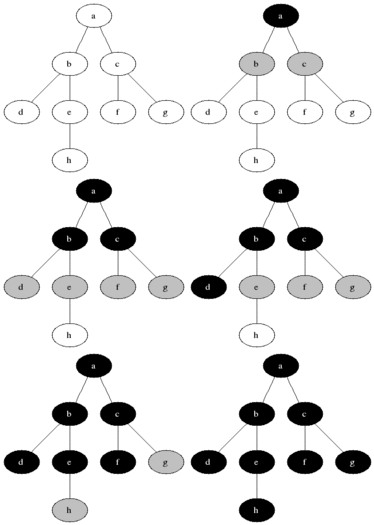
search as deep as we can one route before backtracking (e.g. select a neighbour to the root node, visit that neighbour, then select a neighbour from that node and visit - continue this until we reach a node that we cannot follow any more edges from, and then backtrack up the graph considering alternate neighbours at each step)


DFS is pretty simple to implement and nataurally uses a Stack data structure to keep track of the backtracking (the easiest way to do this is to solve recursively using the implicit Stack)

Below is a simple Java implementation of DFS using recursion to handle the backtracking.


Breadth First Search (BFS)

This search takes the different approach of looking as wide as possible before moving down a level. For example, we will visit all the immediate neighbours of the root, then select one of the immediate neighbours and visit their immediate neighbours - then backtrack up to visit other neighbours at this level.


(image also from wikipedia)


BFS is also fairly simple, and pretty close to DFS but it uses a Queue (FIFO) structure rather than a stack to visit nodes from the root down first.  Below is example code of BFS implemented in Java.


Graph data structures - An introduction

With most problems it is largely pretty clear which data structure is going to be appropriate to use - If you just care about storing a list and iterating over it, then you probably want an Array based structure - if you particularly care about the elements being unique you could look as a Set. If you want to capture a key-value pair dictionary data structure then you can use a Map.

Graph data structures are no different, and are very applicable to a subset of problems, and once familiar with graphs and the common algorithms it becomes quite easy to quickly identify the problem type as a graph problem.


The basics

A graph has two main elements:
  • Node - a given data point in the graph
  • Edge - a connection that joins any two Nodes. A graph can be "directed" or "un-directed" - this simply determines whether the Edge goes both ways or is purely one way. 

A graph is a data strucutre that stores a set of connected elements - the easiest way to understand the structure is with a real world example, the most famous is probably like the social-network graph. If you think about your profile on any popular social network (Facebook/LinkedIn/etc), your profile is a Node in the graph, and each of your friendship/connections is an Edge to another Node in the graph

A while ago, a Facebook intern created a visualisation of the Facebook social graph around the world - you can't really make out the individual Nodes/Edges, but you get the idea.


In Facebook's graph, it is un-directed, that is, when you become friends with another Node in the graph the relationship goes both ways - you are their friend and they are yours.

Twitter, however, is a directed graph - once you follow someone an Edge is created between your Node and theirs, but they don't automatically follow you as well, so the Edge has direction.


If you are a LinkedIn user, you may have noticed whilst browsing another user's profile a widget saying something like

"X of your connections can introduce you to someone who knows Y"


What LinkedIn is telling you, is that the shortest path between your Node and Y's Node in the graph is 3 Edges (3 "hops" - following an Edge between nodes is often called a "hop") - To be able to do this, LinkedIn is searching the social graph space to discover the shortest path (and number of unique paths that are of the shortest distance) between you and this other user.


Graph representations

There are two primary graph representations:
  • Adjacency Matrix - This is a matrix/2-D array that captures the relationship between every node. Every node is mapped against the X and Y axis, and the value in the intersecting cell determine if their is an Edge between the nodes. E.g. if we wanted to know if there was an edge between Node "4" and node "13" we would look at matrix[4][13] - the value there would tell us. Normally, value of 1 represents an edge, but other values can be used (for example, if it is a weighted graph the values could represent the weights, or if it is a directed graph it could use -ve/+ve values to represent direction).  This representation is good for "dense" graphs.
  • Adjacency List - This representation is simply a List of all Edges and a List of all Nodes. This is a simple representation and is more memory efficient for "sparse" graphs

For the code samples here, I will focus on the Adjacency List representation


Graph representation - Java

Below is a very rudimentary implementation of a Graph class in Java. It uses a Adjacency List representation and will be used in later examples I go through.


Below is a sample unit test setup that shows how a simple graph can be initialised:


In the next post I will go through basic techniques for searching and exploring graph spaces, as well as a post looking at how to solve the LinkedIn shortest path recommendation problem.


Spring and Neo4J integration - A Quick WebApp


Following my experimentation with MongoDB and the SpringData integration, I was keen to try out a few other NoSQL options - notably something outside of a document based data store. I had heard about a competition asking for submissions for Neo4J on the Heroku platform, which initially sparked my interest (although as of yet I have not tried it on Heroku) and seeing as Spring Data already had the Neo4J integration I thought I would have a go at it. Plus, I enjoy graphs as a data structure. I have fairly recently done some work on graphs having to implement Dijkstra's algorithm (also the A*) so this seemed like it was going to be fun.

Firstly, the documentation, in the form of an online e-book, for Neo4J Spring Data is awesome. Some guys have put together the e-book based on their experience setting up a Neo4J website and it really does cover everything from the first steps through to more complex stuff around traversal and transaction management. This also means, there is little point in me going through my every step in my app, as it wouldnt be very different from their advice, so most importantly, read this!!!

I will however, just highlight some interesting points i discovered along the way:

1. Simple Annotation based Entites
As you would expect, much like JPA or MongoDB, Neo4J supports simple annotation based configuration of your domain model to simply and quickly describe some pretty rich graph relationships. This is not that unexpected, as it is Spring after all, but worth noting that it is pretty comprehensive and easy to use.


2. Magic Repository Methods
A bit like in Grails, the Neo4J supports "magic" methods, that allow you to just define method names and the query implementation will be completed for you. For example, in your Movie repository (As per the book example, and also my example) if you defined a method such as:

Movie getMovieById(String id);

Then you do not need to provide an implementation, and Spring will automagically do the rest. (the convention being get[DOMAIN_ENTITY]By[ENTITY_PROPERTY]()

From the book: "In our wildest dreams we imagined the method names we would come up with, and what kinds of queries those could generate"

3. Arbor JS Graph Framework
A little while ago I discovered the Arbor JS framework for visualisation of graphs, and its really nice - I had to try and achieve something similar some time last year and got some of the way using core html5/JS but this library is a lot more comprehensive so wanted to have a go.
First, you should check out the demos over at http://arborjs.org/, they are really nice, and make for a really nice graph UI (see screenshot of my app).


4. The Data
I wanted to get some real data, and looked at a few big datasets available online such as the Stanford Large Data Set Network but being as Im only running locally, and I didnt really want to spend too much time getting the data into my graph model I decided to go for a far smaller, simpler dataset - this years Oscar nominations (actors/directors/movies/awards - hopefully you can make out the graph from the screenshot). The data I got from the Guardian (probably UK only) data set blog which also had some nice data sets in it, but this one seemed to be a small enough size for me not to loose too much time to the data.


As always, the code is up on my github, so feel free to check it out, fork/download/mistreat etc..