Showing posts with label design. Show all posts

Building a RESTful API like a Product Manager

Something I have been thinking about for a while is the idea of APIs as your Product - the idea that you should design, build and test your API like it's a public facing product (as it might actually be if its a public API), and what lessons we should be learning from Product Managers about how we achieve this.

In the latest instalment of their "Technology Radar", ThoughtWorks recommended the concept "API as a Product" as ready to trial (although I think it's far beyond trial stage - I can see no real risk of adopting the lessons from Product Management for your API).


I have generally been interested in Product Management for several years - I think it's hard not to get interested in the science of Product Management when you are building side projects, as you naturally have to think about the product you are building - sure, with side projects they can easily turn into vanity projects, where you just build what you think is cool, but I think it's still fun to think about real users and good Product Management techniques that can be applied even to side-projects.

Having tried to gain some understanding, I have turned to some classic material on the subject of Product Management: The Lean StartupDon't Make Me ThinkHow to Build a Billion Dollar App. I have also been lucky enough to attend Mind The Product Conference twice (though volunteering - but managed to watch lots of the talks), and to have worked with several great Product Managers.

So what lessons can we start applying? I think, if one statement sums it up, its an idea from Kathy Sierra:

Does your product make your users awesome?
This is a great way to think about APIs (I'm mostly talking about REST/GraphQL type APIs here - but this thinking is a great way of approaching design for normal class/interface/library APIs too).

As engineers, I'm sure we have all used APIs that don't achieve this - APIs that make us have to think, that make us feel stupid, that seem overly complicated (for example, the old Java Date library - the number of times I had to google just to find out how to simply create a specific date for something simple like a unit test is ridiculous). And hopefully, we have all used APIs that make us feel awesome - APIs that make us productive, that let us do what we expect to be able to do, and can (with the help of the IDE's auto-complete) let us guess what the method calls are.

Another idea Kathy Sierra mentions in that talk, and is also made famous from the title of the Product Management classic, is:

Don't make me think

I have written before about the StackOverflow and GitHub APIs, but they deserve a mention again, if you have ever written an integration with them, you will know.  The APIs are designed in such a way that sensibly models the domain model.

For example, take StackOverflow, if we were going to describe their domain model, what first class objects would we have? I guess Questions, Answers, Comments etc - and sure enough, their API models these:

/questions - will get you all the questions on the site

/answers - will get you all the answers,

Now, how do you think you might get all answers for a given question? Well, a list of answers should probably be a child of a question, so something that represents that, something like:

/questions/{Question ID}/answers

Sure enough, thats the URL - and the behaviour is consistent through the design, I'm sure you can guess how you might retrieve all comments for a given answer.

I'll be honest, developing against an API where I can guess the endpoints makes me feel pretty awesome.

MVP and the Lean Product

The idea of a Minimum Viable Product is a core concept in Lean Startup - the idea that you build the minimum version of the product that can get you feedback as to whether you are heading in the right direction before investing more effort in building out a fuller fledged product.

Whilst I think an appreciation of an MVP is a good awareness for any engineer - I have generally found it is useful in facilitating conversation when building a new product - if as an engineer you recognise some new feature is going to be considerable effort, its helpful to think about what hypothesis the feature is trying to test, and is there a simpler engineering solution to test the hypothesis.

However, the principal of not over engineering the API is also a good one - once you have a well designed domain model, its quite tempting to get carried away with REST design best practices and start building endpoints for all different variations of the model - however, unless you need them, it's better to start with less (if you are building a public REST API from the start then it might be harder to know what isn't needed, but you can still certainly build an MVP version of the API to test the hypothesis - e.g. whether people actually want to use your API)

User Testing

Another important part of building a product is collecting user feedback - Whilst a REST API may not be well suited to A/B testing (your consumers won't be very happy if switch the API design on them after they have implemented against a specific variation!), listening to user feedback is still important - because the consumers will likely be engineers (writing the client code), then hopefully they will be expecting REST standards and good API design principles, but another way to think about this is the importance of not making breaking changes to your API.

A technical way of thinking about this is Consumer Driven Contracts Testing - As RESTful APIs are de-coupled from the client code, the API doesn't have any idea what clients are using or doing, so this approach allows consumers to define what they expect from the API, and then the API can always test against these contracts, so be sure that any change to the API is still in keeping with existing consumers, or users, of the API.

Conclusion

I think, in general, all engineers can benefit from thinking about how good products are built, what concepts are important, and be able to think about the products or services they are building in this way - both in terms of thinking about the actual implementation as a product that someone else will be the user of (either externally if a RESTful API, but also internally if its cross-team or even just someone coming to take over your code once you have moved on).

Best free stock images

As internet speeds generally continue to increase, the trend to have full screen background images continues.  I like to have full screen images on splash screens and landing pages, so here are some of the best (free) image resources I have found online:


  • unsplash.com - 10 new completely free hi quality photos every 10 days. Lots of great photography, with nice landscape/outdoors stuff (archive)
  • Death to the stock photo - an email based subscription, where original high quality shots are sent to you via email
  • The Pattern Library - I love this, not stock photography, but an art project of background textures/patterns. Just scroll down to check them out. This is my favourite.
  • Subtle Patterns - Similar to above, not stock photos, but nice, free to use textures. Simpler than the pattern library, but lots of nice backgrounds to use.
  • Free Images (formerly stock.exchg) - If you can ignore the site design & adverts, and wade through the 90s style stock graphics, there are still alot of nice images to use.
  • Pic Jumbo - More high quality, large images


Flat Design (& Android)

"Flat" is currently a big design trend, with pretty much all the big players getting involved.  One of the earliest big-hitters in the field was an iOS app called LetterPress (incidentally, the designer behind this has recently been working on Facebook's "Paper" app - which is also a pretty nice experience)

http://www.atebits.com/letterpress/

The trend found a surprising champion in Microsoft with their Windows Metro look (Windows 8, Windows mobile, xbox), before Apple(iOS 7) later joined the party as Jonny Ives took responsibility for software design as well as hardware. Now many of the most popular sites are sporting a flat look (Google flattened its logo, twitter went flat, even NerdAbility.com is sporting a flat design).

Flat design is about being more minimalist and user-focused - it skips the fanfare of effects or lifelike details for apps/backgrounds/controls and favours simple, clean, crisp minimal interfaces. It's kind of the opposite to the skeumorphic approach - which is using lifelike textures/look&feels for things (the obvious examples being on iOS pre-7 where the contacts have graphics in the background that make it look like a leather address book, or the notes app that has a lined paper background etc).  It avoids fancy 3-d fonts and elements, avoids shading, shadowing, textures - and just uses simple colours, fonts, shapes to quickly convey meaning (see letterpress image above - no fancy rounded corners, fonts or textures - just simple block colours).


Flat Android Design

There is no reason why you can't design an Android app following flat trend, in fact lots already have - Thankfully, as a core part of the flat trend is simple, it is simple to build flat looking apps in no time at all.

Fonts

There isn't any hard and fast rule on fonts really - obviously it should be simple, clean and understandable - for this reason, clean, light san serif fonts have been a common font style to use. The most famous, as used by Microsoft, is Open-Sans - this is the font used across their Windows8 OS. It's popularity also boosted by the fact that it is freely available on Google Fonts, so has swept the web in a fairly big way.


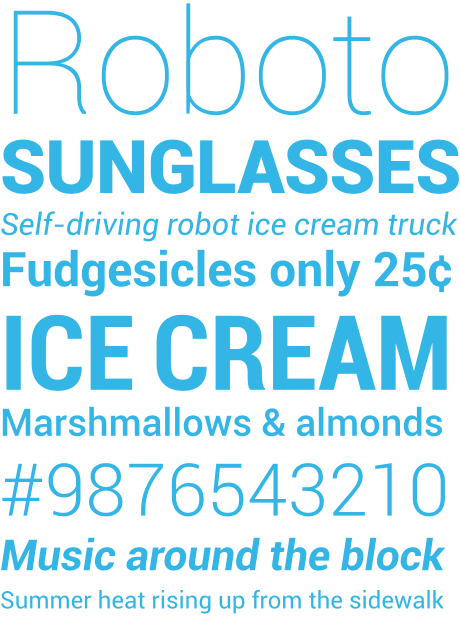
Thankfully, as it happens, Android (since 3.0) has come with packaged with a lovely san-serif font called Roboto. The range of weights, especially the thin and bolder weights allow you to achieve similar aesthetics in line with common flat design, whilst presenting a professional, clean & simple typography.  The obvious disadvantage of using the font is as it's built into later Androids, it's fairly widely used.  Personally, I like to use it. I use the default Android font largely across my apps, and if I want to add a bit of character to a heading/title then I opt for the thinner version of the font.


Buttons

Buttons are an interesting one.  Whilst the flat trend is becoming more pervasive, there are still questions regarding buttons. Buttons have always been skeuomorphic by design - the shading and texture to show a raised/bevelled button (like a real life button that you might press) is classic skeumorphism, and whilst this is simple to switch to a 2-D, flat look&feel, there are still arguments as to whether you should do this - as the button look and feel communicates to the user that it is a button - it is so widely accepted a metaphor, people seem concerned that without the detail, people may not understand it is a button. How can they tell if something is a button or just a coloured block quote? (see this stackexchange question on the topic)

http://www.nngroup.com/articles/windows-8-disappointing-usability/

 Above is an example from Windows 8 controls - as pointed out on the StackExchange link, all of those icons are actually buttons, along with the "Change PC Settings" - That could be fairly confusing, and would be an example of how not to design flat buttons.

Personally, I like flat buttons - as long as you take care to design the page so that the buttons are clear, and the form/page obeys general good UI heirarchy - an example of a simple form I was creating for an app with simple flat buttons is below:


As you can see, designing forms/controls that obey standard UI heirarchy and normal metaphors then it is still incredibly simple and clear what are buttons are what aren't. (I know it doesn't look like a fancy form - there are other decorations elsewhere as well though!)


Colours

There are of course, no rules about colour - but there are trends. A simple google image search for flat colours will give you lots of palettes, and there are also lots of great free tools on the web for building palettes

http://mikehince.com/design/amazing-colour-resources-for-designers/


Adobe's Kuler being a great example (lets you build schemes as well as share them with the community and look at other schemes)